EVerest APIs
Preface
There are different APIs available in EVerest, which can be used for different purposes. This page describes the stable EVerest API which consists of a number of API modules.
Other APIs that are available, but not described here:
API module (deprecated, see the deprecation index)
EvAPI (deprecated, see the deprecation index)
Part of the EVerest APIs described here are the management APIs, which are a special case and are described on a separate page:
Introduction
Tip
You can find the API reference documentation here: EVerest API Reference .
EVerest can be extended and adapted to specific needs via two sets of APIs: The internal interfaces and the EVerest API.
The EVerest API are versioned and guaranteed to not introduce breaking changes for the same major version of the API, while the internal interfaces may change between versions. Therefore, the EVerest API is the preferred way to implement custom integrations, extensions and adaptations.
Tip
If you plan to integrate EVerest on your charging station hardware we strongly recommend to use the EVerest APIs for this purpose, since these interfaces are the ones that are supposed to be kept stable and maintained. over time.
Overview
The EVerest API is the interface for hardware integration, custom extensions and adaptations. It is provided via a public MQTT interface, and the format for data exchange is plain text JSON. The API is defined in AsyncAPI 3.
Custom client software using the EVerest API is therefore only loosely coupled to the EVerest application and its internal interfaces. There are no obligatory binary or link time dependencies of any kind. As a result, the clients can be built individually and without reference to the EVerest application at all.
This also implies that the programming language used for implementing the client can be chosen freely. Typically a compiled language is preferable for an embedded target, but it is not strictly required at all.
The EVerest API is implemented in terms of EVerest modules, and every API module implements one or more of EVerest’s internal interfaces. There are two distinct versions of API modules, either to implement an interface (e.g. a driver for a DC power supply) or to consume it (e.g. to check for the validation status of a token).
Important
The management APIs are a special case of EVerest APIs, since they are not intended for hardware integration or custom extensions, but rather for remote management of EVerest itself. They are implemented as part of the central manager process and not as separate modules. They are disabled by default and need to be enabled explicitly by adding the respective command line argument to the EVerest startup command.
They can be included in the configuration file just like any other module. E.g. - in this example -, a EVerest API module was loaded to fulfill the power meter requirement of the EvseManager. The actual code that talks to the power meter hardware to fetch the measurements can now be implemented in a process running outside of EVerest (and is started e.g. by a separate systemd unit). It just needs to feed the measured values via MQTT into the Powermeter API module.
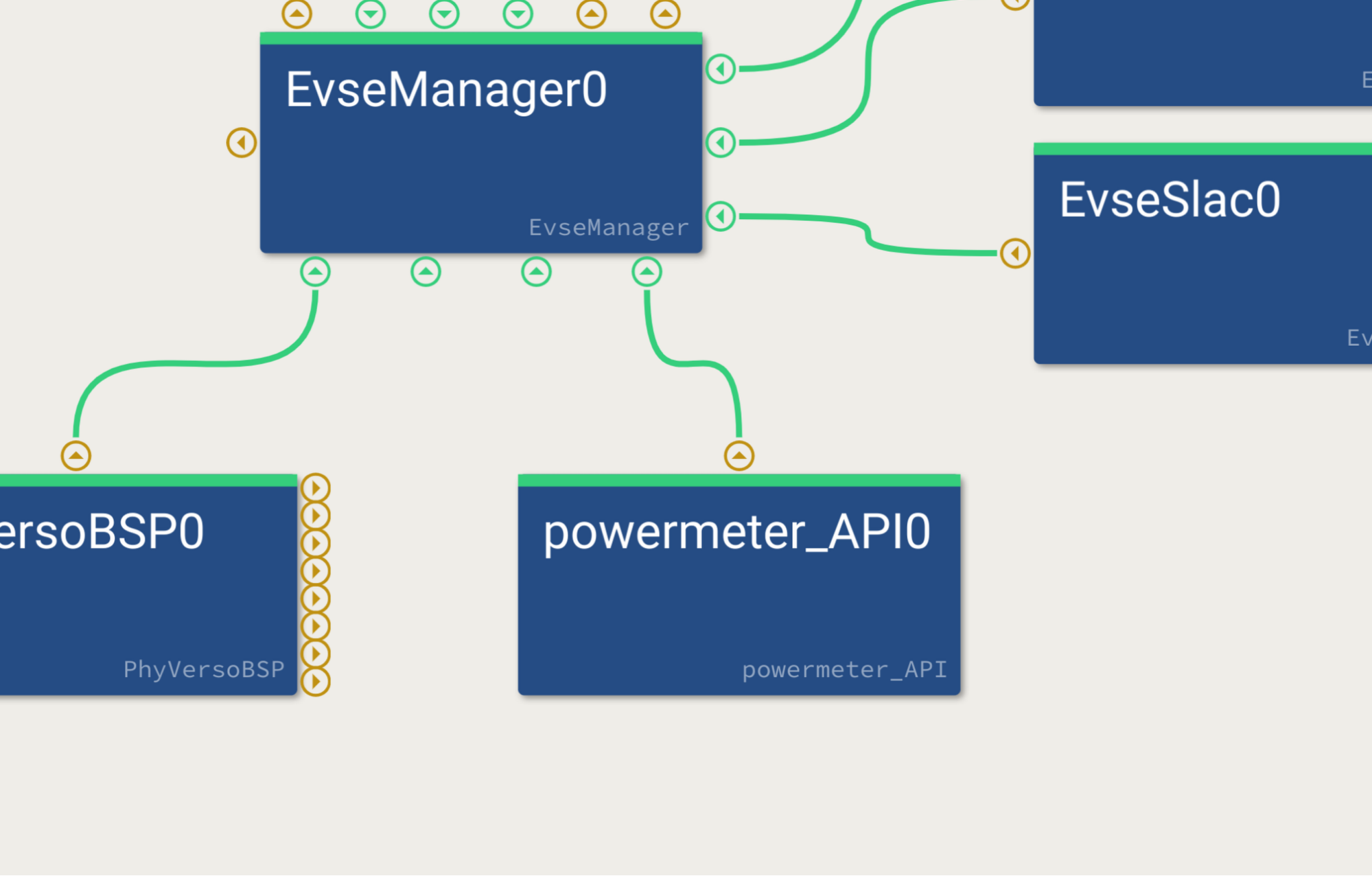
For a better understanding of how the EVerest API works, let us have an exemplary closer look at the Power Supply DC API module.
The manifest can be reduced to this:
config:
  cfg_communication_check_to_s:
    type: integer
    default: 5
  cfg_heartbeat_interval_ms:
    type: integer
    default: 1000

provides:
  if_power_supply_DC:
    interface: power_supply_DC
There are two configuration variables which are common for every API module. Both are related to communication checks between EVerest and the client module.
Below, there is the provides section, which states that this API module is a DC power supply. This implies that it can be used in the configuration file for EVerest wherever a DC power supply is expected.
In a product, this would be the EvseManager requiring a DC power supply. During development or validation it could also be a BringUp module.
In contrast to an integrated driver for actual hardware, the API module creates MQTT topics according to its specification and by this provides hooks for the client to do the implementation work.
The documentation of the APIs can be found in the respective reference pages. Each API module has its own reference page describing the messages, topics and data structures used.
Let’s take a look at an example configuration that uses the API module:
active_modules:
  ps_dc_1:
    module: power_supply_DC_API
    config_module:
        cfg_communication_check_to_s: 60
            cfg_heartbeat_interval_ms: 1000
  cli:
    module: BUPowerSupplyDC
    standalone: true
    connections:
    psu:
        - module_id: ps_dc_1
        implementation_id: if_power_supply_DC
It loads two modules: The power_supply_DC_API and the BringUp module for DC power supplies. Starting EVerest with this configuration enables the API for DC power supplies and a BringUp module, that can send to and receive messages from the API. The actual topics on the MQTT will be available under everest_api/1/power_supply_DC/ps_dc_1/.
It is as simple as this.
As explained previously, the client is only loosely coupled to EVerest. As a consequence, EVerest cannot know by itself whether the client is available and in good working conditions. For this reason, a bidirectional communication check is available.
EVerest APIs sends heartbeat messages periodically (cfg_heartbeat_interval_ms - with values of zero or less disabling heartbeat messages) and on the other hand requires the clients to send communication_check messages within the timeout interval specified (cfg_communication_check_to_s - with values of zero or less disabling the requirement for these messages).
If no communication_check arrives in time, the API module raises a CommunicationFault, which the next communication_check clears, whatever its value. Sending false also switches the check off until the module restarts.
To clear an error raised through an API, send clear_error with the same type and sub type.
Most numbers with a fractional part are handled as 32-bit floats, so they keep only about seven significant digits.
In situations where a request/reply pattern is implemented, the timeout for a response can be configured (cfg_request_reply_to_s, 100 s by default and at most). These timeouts cannot be disabled, and they must stay below the framework’s 120 s command timeout so that the default response still reaches the caller. In general it is advisable to respond as quickly as possible in to to prevent EVerest from blocking internally. A reply that does not match its schema ends the request at once with the same default response as a timeout.
AsyncAPI
The EVerest API is defined in terms of AsyncAPI 3.0.0.
For a thorough introduction and reference refer to https://www.asyncapi.com .
All EVerest API modules are located in EVerest/modules/API and each module contains the API definition in EVerest/docs/source/reference/EVerest_API/<name-of-api>.yaml file. These files are used to generate the HTML-based documentation.
In order to build the documentation including the API reference pages, run the following command in your build folder:
cmake -DEVEREST_BUILD_DOCS=ON .. && make trailbook_everest
Another possible way is to use the AsyncAPI yaml source file in AsyncAPI Studio.
The <name-of-api>.yaml is defined for the client implementing the API and reflects the client’s point of view, when using the words send and receive in the context of actions and operations.
The MQTT topics of the EVerest API follow a fixed pattern. All topics are prefixed with everest_api/1/{api_type}/{module_id} - with 1 being the version and {api_type} the type of the API.
{module_id} is the module id of the API module as configured in the EVerest configuration file.
The prefix is followed by the direction of the message. There are two options:
m2e for messages from the module (client) to EVerest and
e2m for messages from EVerest to the module (client).
This is finally followed by the name of the message. Here is a complete example:
everest_api/1/power_supply_DC/ps_dc_1/m2e/voltage_current
In the example, power_supply_DC is the API type, ps_dc_1 is the module id as configured in the EVerest configuration file, the message (m2e) originates from the client and is directed towards EVerest. The message name is voltage_current.
AsyncAPI defines channels which carry messages. A channel can be addressed via the topic as defined above. Each channel can in principle carry multiple messages, but concerning EVerest API, there is a one-to-one mapping between a message and a channel. A message carries content in the form of payload and possibly headers.
Commands without arguments carry an empty JSON object ({}) as payload,
never an empty payload. Request/reply messages without arguments consist of
the headers object only; the payload property is omitted. EVerest
ignores a payload sent with such a request.
A payload whose schema is a plain number or integer has to be a JSON number of that
kind: booleans, strings and null are rejected with a log warning, and an integer
channel rejects a fraction. The same holds for number and integer properties of
an object. A number that does not fit the type EVerest stores it in is rejected
as well instead of being wrapped or rounded to infinity. For most integers
that type is a 32-bit signed integer, for most numbers a single-precision float
(up to about 3.4e38).
The content type for EVerest API is always JSON. The content is individual for each message and defined in components:schemas within the same file or sometimes in a referenced file.
EVerest discards a message from a client whose payload it cannot read,
for example because a required field is missing, a field has the wrong
type or an unknown enum value, or a field declared as
format: date-time is no RFC 3339 date-time. It logs a warning, and a
discarded request gets no reply. RFC 3339 requires a UTC offset, so a
date-time in local time carries its offset, for example
2026-10-28T14:03:07.123+01:00. Date-times must lie between
1677-09-21T00:12:43.146Z and 2262-04-11T23:46:49.854Z. For an
open end, such as timestamp_to in an error history filter, use
2262-04-11T23:46:49.854Z; 9999-12-31T23:59:59Z is discarded.
AsyncAPI finally specifies operations on channels. The operations define the action on a specific channel (for EVerest API always from the client’s point of view), which can be send or receive.
In many situations, the sender of a message is not interested in the receive status of a message, e.g. in a situation where a meter publishes its current values. Simple send and receive operations are used in this case.
There are situations however, where this is not the case, e.g. remote procedure calls or when a reply is requested. EVerest API handles this situation with the request/reply pattern offered by AsyncAPI.
The operations are then augmented with a reply property holding the reply channel and a dynamic reply address.
If the client receives a request, it has to reply to the topic provided in the header’s replyTo property within cfg_communication_check_to_s seconds. If it does not, a default response is given by the API to EVerest and an error is raised. Requests sent by EVerest always carry replyTo.
If the client sends a request, it specifies the reply topic, where it expects the answer, in the replyTo property of the headers object. It is the client’s responsibility to ensure that the topic is unique in order to relate replies to requests. A client that is not interested in the reply omits replyTo: EVerest executes the request and discards the reply.
EVerest rejects a request without executing it if
the request is not a JSON object, or its headers is present but not an object (
nullincluded),replyTo is present but not a string,
replyTo is not a topic a reply can be published to: empty, longer than 65535 bytes, containing a NUL character or the wildcards
+or#, or starting with$, which is reserved for the broker,replyTo lies in a namespace EVerest subscribes or publishes to, where a reply could be taken for another request or for a message from EVerest:
everest/..., the framework’s internal namespace,everest_external/nodered/..., the Node-RED debug interface of EvseManager, EvManager and the board support modules,any
everest_api/...topic that does not have at least two levels below ane2mlevel, or that has anm2elevel. This covers them2eande2m/<name>channels of the API modules,everest_api/discover,everest_api/query-modules/...and theeverest_api/<module>/cmd/...topics of theAPI,Setupand OCPP modules and the simulators.
A reply topic in
everest_apitherefore looks likeeverest_api/1/<api_type>/<module_id>/e2m/<operation>/<unique id>. Thee2mchannels of the API specifications are one level deep (e2m/<name>), so such a topic never collides with one of them.The list covers EVerest’s own topics. It cannot cover topics that a module subscribes to from its configuration or that out-of-tree modules use, nor a
mqtt_everest_prefixother than the defaulteverest.
Using the EVerest API
In order to use the EVerest API, load the required API modules in the EVerest configuration file and connect its interfaces as presented in the Overview section.
The chosen module id becomes part of the MQTT topic. EVerest API modules can be loaded multiple times, e.g. if two DC power supplies are connected.
If needed, adjust the heartbeat interval and communication check timeout via the cfg_heartbeat_interval_ms and cfg_communication_check_to_s configuration variables of the module.
Although communication check and heartbeat can be disabled with values smaller or equal to zero, this is not recommended in a production environment, since they are the only way to continuously check whether the client and EVerest are online and responsive.
EVerest API clients are completely independent applications. They have to be started independently of EVerest, possibly by their own systemd service.
EVerest cannot start them, since it is agnostic of them. If communication check is enabled and no communication check message arrives within cfg_communication_check_to_s seconds of EVerest startup, the API modules raise an initial communication check error. This error is cleared with the first communication check message sent from the client. It is raised again when a timeout occurs or a request is not answered. Sending a communication check message clears the error again.
It is the responsibility of the user to ensure that the client is and remains available. This includes potentially a watchdog that restarts the client in case of crash or deadlock. It is also the client’s responsibility to ensure proper initialization, shutdown and surveillance of managed hardware, e.g. a DC power supply.