BringUp Powermeter
In case your charger prototype has a power meter, it may be a good time to verify its functionality as well now - even though it is not strictly necessary for charging.
Write a bring-up config for your power meter and start it the same way
as described in BringUp & Qualification. There are a few examples you can copy
and modify, e.g. config-bringup-DZG.yaml or config-bringup-LEM.yaml.
/etc/everest/run_tmux_helper.sh /etc/everest/bringup/config-bringup-mypowermeter.yaml /usr
Your setup should look like this:
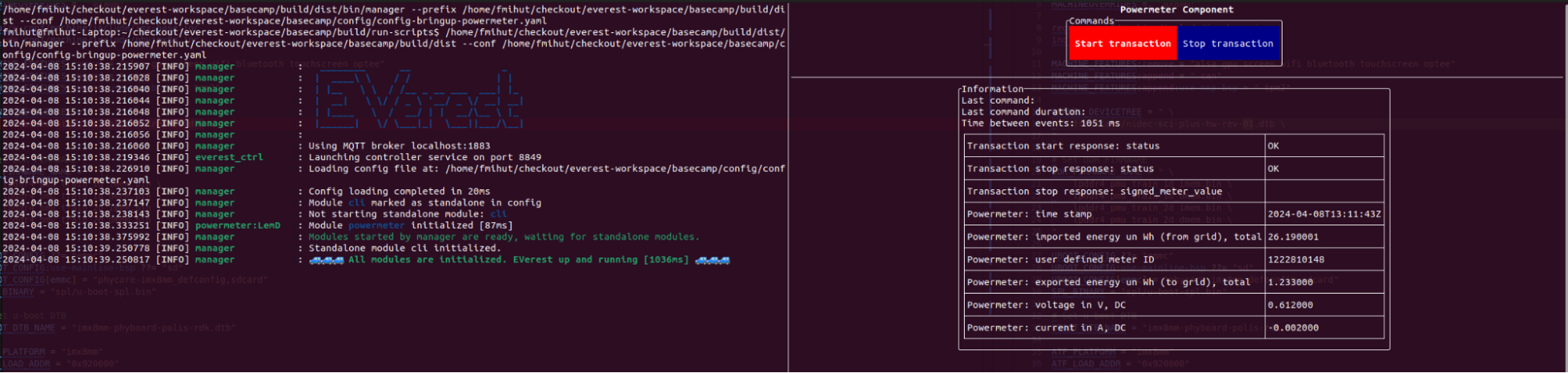
Complete the following steps:
Verify that the measurements come in regularly (e.g. every second).
Imported energy in Wh and timestamp are the only required values. Verify they are correct. For bidirectional metering, also verify the exported energy values.
Validate the other reported measurements.
If supported by the power meter (e.g. for German Eichrecht), click on “Start Transaction”. Verify that it replies correctly, and verify the time to reply is less than a few seconds.
Click on “Stop Transaction” and verify the reply. The reply should not take more than a few seconds.
Apply some test load if possible, and verify that the flow direction of energy is correct. A common mistake is to swap input and output of the meter. If you don’t have a test load, you can also test this when doing the first charging tests with a real car.
Authors: Cornelius Claussen