BringUp Powermeter
In case your charger prototype has a power meter, it may be a good time to verify its functionality as well now - even though it is not strictly necessary for charging.
Write a bring-up config for your power meter and start it the same way as described in BringUp & Qualification. There are a few examples you can copy and modify, e.g. “config-bringup-DZG.yaml” or “config-bringup-LEM.yaml”.
/etc/everest/run_tmux_helper.sh /etc/everest/bringup/config-bringup-mypowermeter.yaml /usr
Your setup should look like this:
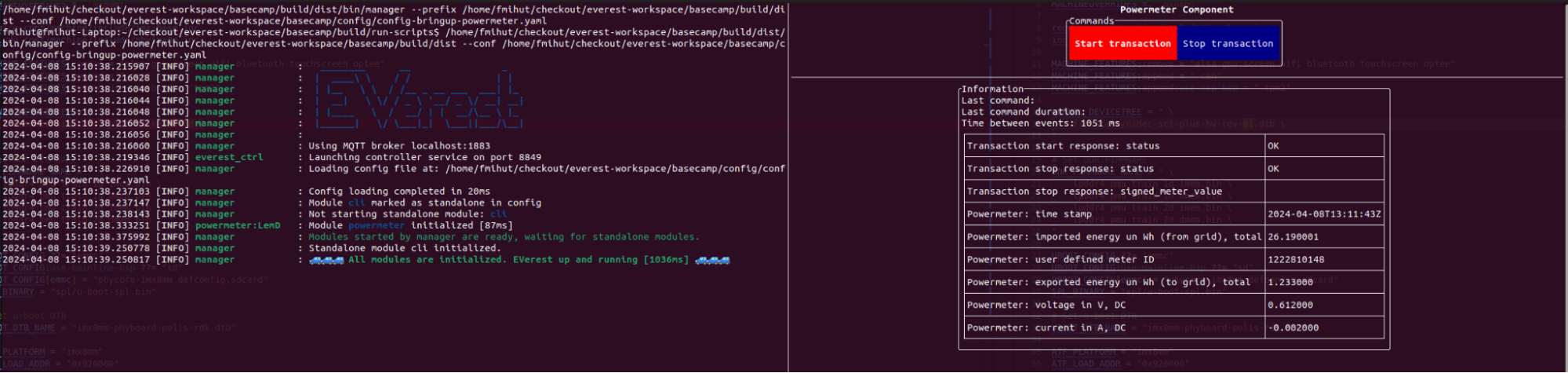
Complete the following steps:
☐ Verify that the measurements come in regularly (e.g. every second).
☐ Imported energy in Wh and timestamp are the only required values. Verify they are correct. For bidirectional metering, also verify the exported energy values.
☐ Validate the other reported measurements.
- ☐ If supported by the power meter (e.g. for
German Eichrecht), click
on “Start Transaction”. Verify that it replies correctly, and verify the time to reply is less than a few seconds.
☐ Click on “Stop Transaction” and verify the reply. The reply should not take more than a few seconds.
☐ Apply some test load if possible, and verify that the flow direction of energy is correct. A common mistake is to swap input and output of the meter. If you don’t have a test load, you can also test this when doing the first charging tests with a real car.
Authors: Cornelius Claussen